 Xu Hướng Số
Gather interested people from comments and groups into one sourced customer book
XHS (Xu Hướng Số) is an app you install on your computer, made for online sellers: it reads comments and posts on Facebook, TikTok, YouTube and Threads with your own account or browser profile (and the members of public Facebook groups), gathers them into one customer book with a link to the exact post, then you type one sentence and AI picks out the people you need.
- One book
- from many places, one person per line
- Sourced
- a link to each person's exact post
- Filter in words
- type one sentence, AI picks for you
Use it to: Search by keyword · Read groups and channels · Get commenters · Get new group members
Platform names and logos belong to their owners and only show where XHS can read; they are not official partners.
You say where to look, XHS does the rest
Each scan reads one platform, with your own account and your own connection.
The animations below are illustrations with sample data, not real customers.
- 1Step 1 · You
Say where to look
Type keywords, or paste the link of a group, page, channel or post you care about, then choose the platform and your account.
- 2Step 2 · XHS
Read with your own account
Opens a browser with your account and reads slowly, at a human pace. If a check appears it tries what fits; when that does not work it stops, tells you what to do and keeps what it read.
- 3Step 3 · XHS
Gather into the customer book
One person per line: name, profile link, what they wrote, a link to the exact post and where they were found. The same person met again on the same platform is merged, not duplicated.
- 4Step 4 · You
Filter and export
Tick the customers you want to look at, type one sentence for AI to pick for you, then export a CSV file to use elsewhere.
This is the customer book inside XHS
Screenshots from the app, with made-up sample data. Your real list lives on your computer.
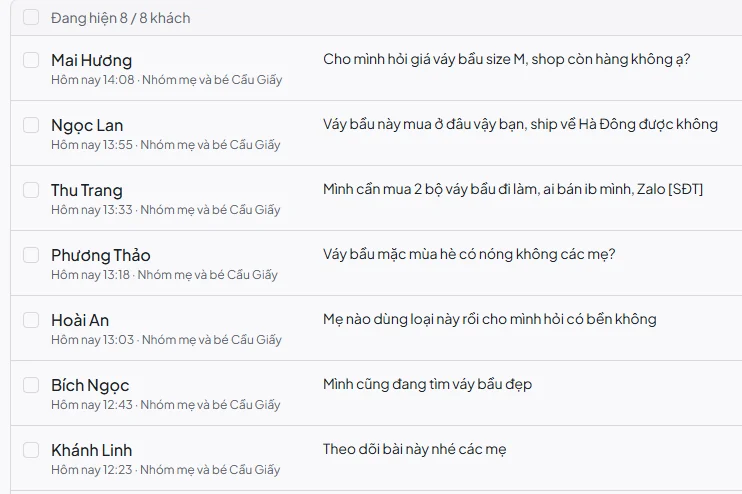
Your own customer book, sourced down to each line
No more scrolling group by group and copying by hand into a spreadsheet.
The animations below are illustrations with sample data, not real customers.
A link to the exact post
Each line opens the exact post or comment where the person appeared, so you can look and decide for yourself.
One person per line
A person who appears many times on the same platform has one line, with how many times they were met.
- Sample data
What they wrote
Their words are kept as written, so you see what they asked and said, not just a name.
Import a list you have
Paste or open a list you already have to merge it into the book, people already in it are not added twice.
Export CSV
A file that opens in Excel, with name, profile link, what they wrote and the post link.
Stays on your machine
The customer book lives on your computer, read with your own account and your own connection.
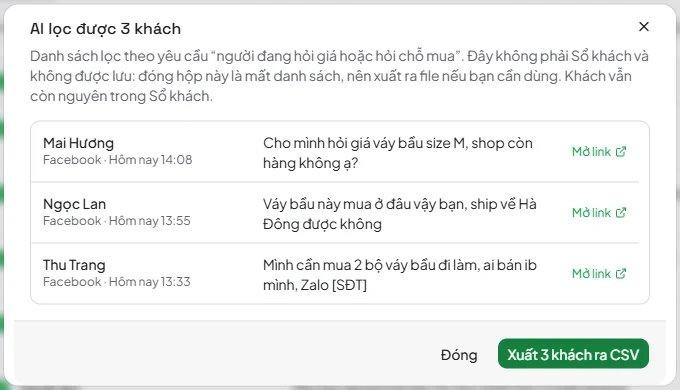
Type what you need, AI picks among the customers you tick
No filter to learn: write a sentence the way you would ask a person, then look at the matching list. That list is not saved, export it when you want to keep it.
Know what is sent before it is sent
An id, what they wrote (cut at 150 characters) and the sentence you typed are sent, phone numbers hidden; no names, links or places.
Your own AI
Use the AI that comes on your machine (free, one-time download) or your own OpenAI, Gemini or Anthropic key. One at a time, never switched for you.
It can be wrong, so check before you use it
AI reads words and guesses by meaning, so it can miss or mix up people. Open the links and check a few lines first.
3 customers matched
Five ways to get people into the customer book
Pick what you plan to do and see what XHS puts in the book.
The animations below are illustrations with sample data, not real customers.
Cycling through the ways on its own, click the one you need to see it alone
- Name and profile link
- what they wrote
- a link to the exact post
- the keyword that found them
- Name and profile link
- the post they made
- where
- when
- Name and profile link
- the comment
- a link to the exact post
- the original post
- Name and profile link
- when they joined
- role
- the group
- The columns that are in your list
XHS is a collecting and filtering tool, it does not promise that anyone will buy or any income. Where you read, how you use the list, and following the platform's rules and the law on personal data are up to you. Platform names and logos belong to their owners and only show where XHS can read; XHS is not an official partner of these platforms.
How it differs from doing it by hand
The three things that differ most between the two ways.
- Finding people
By hand: Scroll group by group, post by post, video by video, tab by tab
XHS: Type keywords or paste links, read many places in one scan
- Recording
By hand: Copy names and links into a spreadsheet, easy to duplicate and lose the source
XHS: One person per line, each with a link to the exact post and what they wrote
- Picking people
By hand: Read line by line to see who is asking what
XHS: Type a sentence for AI to pick, then export the list
XHS does not compare itself with other tools and does not say it is faster or cheaper than any of them. Try one small scan and judge for yourself.
Steps that connect, each usable on its own
Customer collection is one step in the app's chain of selling work. Each step works on its own; you carry your own keywords or list to the next step.
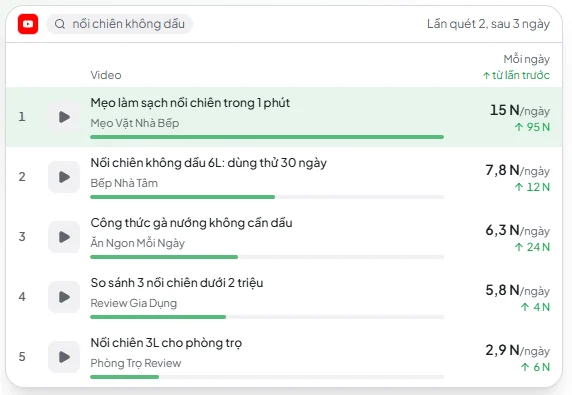 Sample dataAvailable
Trend and product scouting
Reads public videos on TikTok and YouTube and works out views per day to show which videos in your niche are rising.
- Sample dataThis page
Customer collection
Gathers the people who comment and the people who post, in the posts or groups you pick, into one customer book with a link to the exact post.
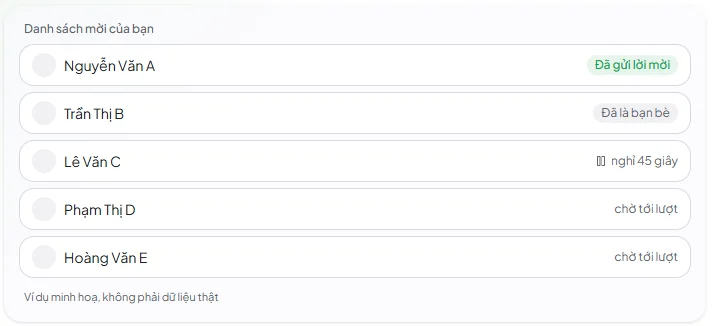 Sample dataAvailable, first step
Outreach
Sends friend requests one person at a time from your own list (the customer book, a CSV or pasted) with your own Facebook account, pausing between people and stopping at the cap you set.
- Coming soon
Comment orders
Not usable yet.
Each step only does what you tell it to and you decide how to use the result; XHS does not guess what you need for you.
Before you download
Will my Facebook account be locked?
No one can promise that. Every read is a real action on your account, and the platform may ask for verification or restrict it when you read a lot. XHS reads on your machine and your connection at a slow pace on purpose; when a check appears and nothing works, it stops, tells you what to do and keeps what it read. Use an account whose risk you accept and scan moderately.
Where does the customer data live, and do I need permission to use it?
The customer book lives on your computer, read with your own account and your own connection. If you use your own AI key, the words of the customers you ticked are sent to that service. Personal data has its own rules in law; how you use it and getting permission are your responsibility, so ask a legal professional if you need to.
What if the scan returns only sellers or old posts?
The customer book keeps everyone who appears at the places you choose, with no scoring and no one deleted, so it holds sellers as well as people who only comment. Lines with no words, only an emoji or only a link are hidden by default and can be shown again. Results differ a lot by keyword and by place. You filter in words and open the link of each line to check before you use it.
Why does a scan sometimes return very few people, or nobody?
The result depends on what the platform shows for the keyword and place you chose: a very narrow keyword, a place with few posts or old posts can return few people or none. Try another keyword, add another place or raise the scan size. A scan that finds nobody costs no run.
Do I need an account?
Facebook, TikTok and YouTube need an account you added to XHS. Threads is read with a browser profile, no sign-in needed. Without that you cannot scan.
Can it get phone numbers?
Only when the poster wrote the number in their words, name or place. XHS has no other way to get a number. Numbers are hidden by default; turn on the switch when you need to show or export them.
Does XHS message or comment in bulk for me?
Not in this tool: Customer collection only reads, it does not post, message, add friends or like. Contacting customers is up to you; sending friend requests is a separate tool (Outreach), which only runs when you pick a list and press start.
How is it different from a UID scanner or a comment exporter?
XHS gathers many places into one customer book, each line with a link to the exact post and the original words, then lets you filter in words. XHS does not compare quality or price with any tool.
Does filtering by AI cost money?
There are two choices: the AI that comes on your machine (free, Windows only, one-time download, needs about 4 GB of free memory) or your own key (OpenAI, Gemini, Anthropic or your own service), with the cost charged to your account at that service. Filtering is optional: exporting and using the customer book work as usual without AI.
What if a platform changes its layout?
The way of reading depends on each platform's layout, so now and then the app needs an update. A run is counted only when the scan kept at least one result: finding nobody, or an error or a press of Stop before any result, costs nothing.
Try one small scan in your niche
Enter a keyword you sell, see your first customer book, then decide whether to pay.
XHS not installed? Download XHS
Facebook, TikTok and YouTube need your account; Threads does not.
3 free trial scans
No card needed. Scan your niche first, then decide.
Rent by the month if you scan often. Not ready to rent? You can still buy runs to try it out.
- A run is only spent when the scan kept results; finding nobody costs nothing
- The customer book lives on your computer, you export a file when you need to use it
- You see the full price inside the app before you buy
Straight talk before you download
- Account
It needs your account
Each scan reads one platform. Facebook, TikTok and YouTube need an account already signed in inside XHS; Threads is read with a browser profile, no sign-in needed. Without that you cannot scan.
- Platforms
Platforms may restrict you
Reading a lot can bring a verification check or a restriction on the account, and when a platform changes its layout the way of reading needs an update. XHS reads slowly on purpose. When a check appears, XHS tries what fits each kind (pauses a while, signs back in with the saved sign-in; a captcha needs your own solver extension or service); identity checks and certificate errors stop it at once. If that does not work it stops, tells you what to do and keeps what it read, without trying anything else. No one can promise an account will not be restricted.
- Limits
Limits of each scan
Up to 500 results per keyword or place, 20 keywords or links and 10 accounts at a time. How many people you get depends on what the platform shows.
- AI
AI can be wrong
Filter by AI reads at most 100 customers at a time and can miss or mix up people, especially with slang and with the on-machine AI on a long list. The on-machine AI is only available on Windows for now. Check a few lines before you use the list.
- Phone numbers
Phone numbers only when the poster wrote them
XHS has no way to get a number other than what the poster wrote. Numbers are hidden by default, you turn them on when you need.
- Data
The data and the responsibility are yours
The customer book lives on your computer. How you use the list and following the platform's rules and the law on personal data are up to you; ask a legal professional if you need to.
- Computer
Windows first, macOS not checked
XHS runs and has been checked on Windows, not yet on macOS. The AI that comes on your machine is only available on Windows, needs a one-time download and about 4 GB of free memory.
Other XHS modules
Vietnamese video dubbing
Turn an English or Chinese video into a Vietnamese one: Vietnamese voice-over and Vietnamese subtitles burned into the picture. Runs on your own machine.
See detailsShort clip studio
From one long video, XHS proposes the moments worth cutting along sentence boundaries, you review and adjust them inside XHS, then get vertical clips with subtitles, built for you to check and then post. Runs on your own machine.
See detailsShort video studio
Paste an article link or some text and XHS builds a vertical video with a Vietnamese voice-over, the article's images and subtitles, built for you to check and then post. Runs on your own machine, with no AI key or account needed.
See detailsSales video maker
Pick a video style, add up to 30 products with your own images or clips, and XHS builds each into a vertical video with a Vietnamese voice, price tag and buy button. Runs on your own computer, no AI keys or accounts needed.
See detailsVideo download
Paste video links and XHS checks them, then downloads them into the folder you choose.
See detailsLink check
Open each link in the browser of a profile you pick, through that profile's proxy, and see whether it is alive, its status code and the final page after every redirect.
See details